
2026/02/24
This issue gives you time-saving Salesforce® tips and resources, as well as our latest app news, and more!
Join Us On the Trail
As winter winds down, we're excited about getting outdoors, hiking, and enjoying nature. And we're also excited to share our latest app, Work Trail, with you.
Designed to boost collaboration and productivity by helping teams remove roadblocks and stay on the same page, our latest Salesforce® app Work Trail, removes the complexity commonly found in other apps, bringing the notes and tasks you need front and center.
The app is perfect for sharing information with team members or across teams as well as defining and tracking tasks. Work Trail also pairs well with project management apps like Milestones PM+. Any Salesforce user or team, whether it’s sales, customer support, marketing, or your entire organization can benefit from it. To learn more, go to the Work Trail Overview page on Passage Technology's website or Work Trail on the AppExchange.
Exploring the Human Element of Business AI
Advancements in artificial intelligence (AI) hold the promise of progress for nearly every aspect of human activity. But the decisions people make are the key inputs to business AI output. Read: What Drives Business AI Success? People More Than Tech.
Is Your Salesforce Data Accurate?
AI has given sales reps additional support, but it has also added more complexity to their processes. In fact, a Salesforce report finds that just 35% of sales professionals trust the accuracy of their data. Read: How Apps Are Helping Sales Teams Leverage Salesforce Data.
Harvard Business Review Analytics Services Survey Says 67% of Collaboration Failures Due to Silos
If your organization is experiencing challenges with communication and information sharing, then you may need to explore what is causing the silos to occur. Read: Unlock Team Productivity By Breaking Down Silos.
Featured Customer Success Story: Rollup Helper Provides Sales Insights Needed for Data-Driven Decisions
We want to hear from you! Tell us your story.
App News & Updates
Rollup Helper Takes Functionality & Usability to the Next Level 🏂
Improved Functionality
We're stoked about new Rollup Helper functionality that includes Filter Auditing and the ability to Disable Force Async per Rollup. The new functionality also includes the ability to run rollups for a record directly from the record detail page using the new Calculate Rollup LWC. Following is more information about each of these updates, along with an image that illustrates the new feature.
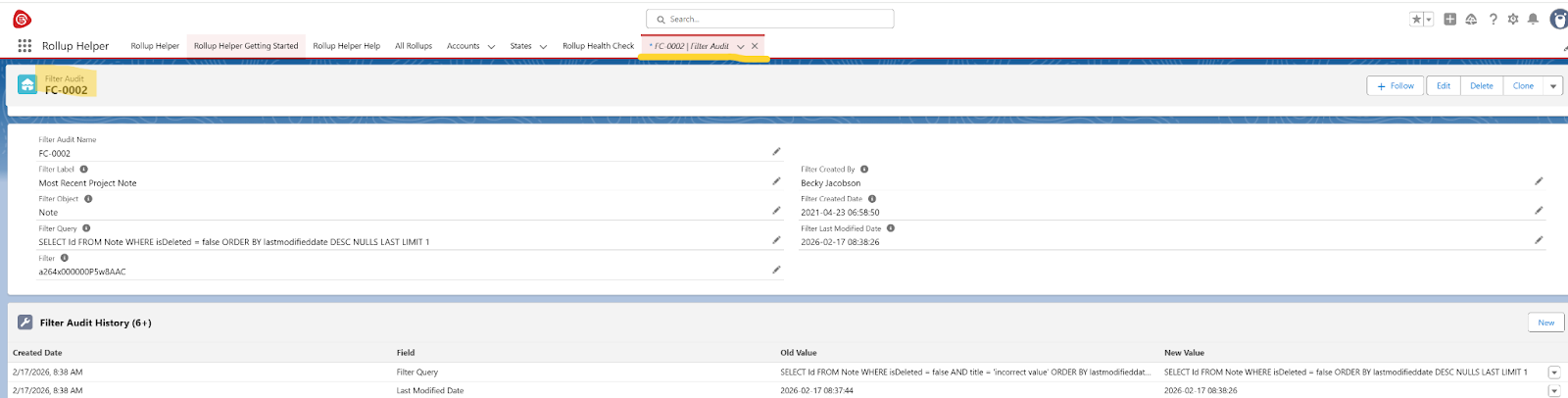
Filter Auditing – Now you can track changes made to filters or track field history on rollups via the PS_Filter_Audit__c and PS_Filter_Audit_History__c objects. No configuration is necessary, and a link to the Filter Audit record is located on the filter’s editor page. (See the image below.)
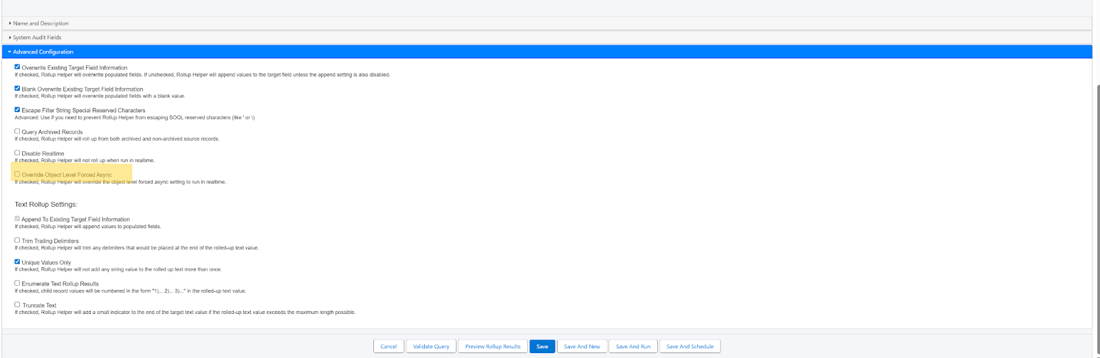
Disable Force Async per Rollup – If an object is set to be Force Async, now you can force individual rollups from that object to run synchronously. This new config option is available on the rollup edit page and will force the rollup to run in real-time even if Force Async is enabled for the source object. (See the image below.)
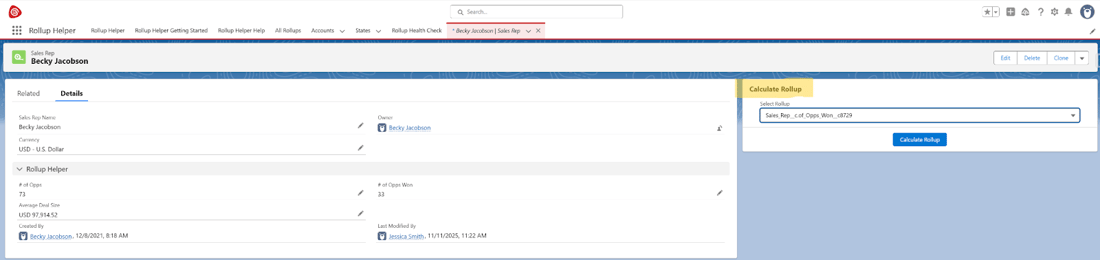
Calculate Rollup LWC – Now you can calculate a rollup from a target record’s detail page via a Lightning Web Component (LWC): c:ps_calculateRollupAction. This makes it easy for users to run a rollup individually for the record and update it automatically. (Note: This is only available in the Premium Edition.) (See the image below.)
Usability Enhancements
Another great improvement is that now you can set Object Specific Record scope from the Health Check page. You’ll also see an Improved Manual Rollup Run User Interface. The improved interface displays a popup instead of directing you to another page. And it allows for faster multiple rollup runs.
About Rollup Helper
With Rollup Helper, you can super-charge your org with capabilities that normally require extensive coding. Rollup Helper overcomes common Salesforce rollup limitations like needing a Master-Detail relationship or the inability to include cross-object formula fields in rollup summary filters. Use Rollup Helper to build mission critical reports and trigger intelligent data-driven workflows.
NEW Pop-up Modal & Other Updates Boost Efficiency for Milestones PM+ Users
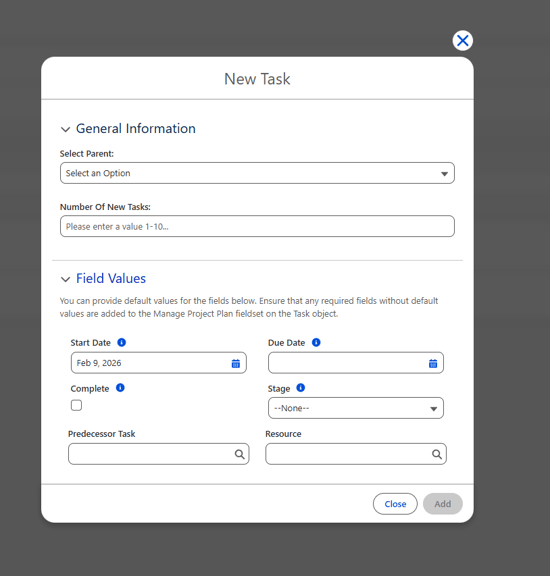
The new Pop-up Modal on the Manage Project Plan allows users to set values for fields before inserting the record. This adds efficiency while preventing any issues with required fields. To-do List items have also been added into Milestone templates, so when you export/import the milestone tasks, To-dos are automatically brought to the new tasks.
We also made performance and usability Improvements including new Custom Settings and added the ability to Hide Internal Tasks on the Gantt chart. And the Duplicate Project Names option allows multiple projects to have the same name. Check out Milestones PM+ Release Notes v17.10.
The image below shows the new Pop-up Modal on the Manage Project Plan.
Exciting news for Milestones PM+ users with Agentforce!
The Milestones PM+ Agentforce project extension is now available for free download from AgentExchange. Read: Milestones PM+ Launches Project Management Agentforce Extension.
About Milestones PM+
Milestones PM+ is a cross-industry, native, project and process management solution for Salesforce. Milestones PM+ gives you instant 360-degree visibility to projects, tasks, programs, milestones, time, risks and issues, and resources in your CRM.
Coming Soon! Data Quality Helper Usability Enhancements
Updates will include an Exceptions page with a new look and feel, and it loads faster. We also added an 'Ignore All' button that allows users with the Ignore All permission set to press 'Ignore All' on validation issues, which then ignores that issue for all users. Stay tuned for more!
The image below shows Data Quality Helper’s new 'Ignore All' button.

About Data Quality Helper
With Data Quality Helper, Salesforce users are notified when bad or duplicative data is entered based on criteria chosen by Admins. This ensures users are entering or updating complete, correct, and non-duplicative data. Hard or Soft Customizable Data Validation & Duplicate Resolution Rules empower Admins to create reminders and warnings for users, which are displayed when certain criteria are met. In addition, Data Cleanup Rules let Admins easily manage data storage and automate a record deletion strategy.
Ready to Get More Out of Salesforce? Let’s Go!
Considering implementing Data Cloud or Agentforce, or both? Need an add-on like CPQ, Field Service, Pardot, Quip, and maps? We're here for you. We can help you make the most of your investment — from initial setup and customizations to automation and analytics. Since 2008, our apps and development services have been trusted by Admins and developers for building solutions on the Salesforce platform. Whether you’re planning a Salesforce data migration, enhancement, or back office app integration project, we’ll deliver on your vision. It starts with a free 60-minute consultation with our development team to talk about your project vision.
We Want to Hear From You
Your feedback and reviews are important to us as we continue to add more features, usability improvements, and functionality to our apps!
| What Drives Business AI Success? People More Than Tech | Passage Technology Blog | How to Maximize Salesforce Data Storage in Your Org |