Rollup Helper: Automate Salesforce Rollup Summaries — No Code Required

Rollup Helper is a Salesforce® app that empowers admins, partners, and developers to create rollup summaries for their users across standard or custom objects — without complex Apex code or Flows. Get real-time insights that save time and reduce manual reporting work.
Install Rollup Helper Free Edition

Watch Recorded Demo


Why Enhanced Rollup Functionality Matters

Rollup Helper gets around Salesforce limitations with enhanced Rollup functionality. It allows you to:

Why Salesforce Admins Love Rollup Helper  

  • Perfect for admins managing data visibility in Salesforce
  • Create complex rollups without writing code
  • Automate summaries across lookup, master-detail, hierarchical, and cross-object relationships
  • Build dashboards with more complete data
  • Improve decision-making accuracy
  • Provides information that enhances flows, validation rules, or formula fields
  • Spend less time trying to track down your data with unnecessary clicks or reports

Rollup Helper’s Key Features

  • Point-and-click rollup creation – Rollups can be set up in as little as three steps, and are just as easy to maintain in the future.
  • Real-time or scheduled rollups – Rollups can be run on-demand (manually via the "Run" function), on a schedule, or in real-time.
  • Supports lookup and master-detail relationships – Since Rollup Helper is not restricted to a Master/Detail relationship between objects, roll-up summary fields in Salesforce are a breeze. Yes, this even includes rollups between objects with a lookup relationship and hierarchy rollups (parent and grandchild rollups).
  • Works with standard and custom objects – Whether your data is in a standard or custom object, or is part of an AppExchange application, your users can find relevant information in one spot. Sales can have their dashboards, and executives will know how KPIs are tracking without asking someone else.
  • 100% Native to Salesforce — no external data storage All your data is processed natively on the Salesforce platform, so we are not consuming any API limits.
  • Choose the support option that fits your needs All editions include access to our excellent support staff via email, live chat, and knowledge articles, with support for Salesforce Classic and Lightning user interfaces.

Rollup Helper Editions: Free, Starter and Premium

Rollup Helper has been installed in over 30,000 orgs, and has a 4.7 rating on the AppExchange with hundreds of five-star reviews!
Feature Free Edition Starter Edition Premium Edition
 Rollup settings 

3 rollup settings

13 rollup settings

Unlimited rollup settings  
 Grandchild Rollup  Requires 2 rollup settings  Requires 2 rollup settings  1 rollup setting 
 Priority support response times  No  Yes Yes

Rollup Helper Premium Edition

New Customer Pricing

Premium Edition

$1,740/org/year This price only applies if you accept our standard agreements. Contact us if you need a customized quote at sales@passagetech.com.

Starter Edition

$780/org/year This price only applies if you accept our standard agreements. Contact us if you need a customized quote at sales@passagetech.com.

More Key Features

Sum, max, min, average, and count rollups

Targeted/parent filter functionality

Checkbox and text rollups

Invocable rollups

Preview rollup results

Unique count rollups

Create custom filters without SOQL

Thirty pre-canned date filters

Advanced currency management

Seamless integration with existing configurations

Consistent access to stable releases

Interested in Rollup Helper?

Common Use Cases for Rollup Helper

Function What Rollup Helper Can Do
Sales Management Roll up closed-won revenue from opportunities to accounts
Support Reporting  Roll up open case counts per customer 
Marketing ROI Roll up campaign responses per region  
Nonprofit Data  Roll up donations to household or campaign records 

More detailed Rollup Helper Use Cases  

How Rollup Helper Works

  • Select a destination object. Choose a target field.
  • Next, select a source object and relationship field.
  • Select rollup type, then select a sourcefield. Add a name and description for your rollup. Run it! 


Rollup Helper FAQs

Is Rollup Helper native to Salesforce?

Yes. It runs entirely inside your Salesforce org and never stores data externally. 

Do I need coding skills?

No — everything is point-and-click with guided setup.

Is there a free trial? 

Yes. You can install a trial directly from AppExchange. 

Can I try for free?

Yes. You can install a trial directly from AppExchange and get 3 free rollup settings!

 More detailed Rollup Helper FAQs 

Related Salesforce Apps and Development Services

Passage Technology’s Salesforce apps provide solutions for many business functions across various industries and clouds

Rollup Helper and all Passage apps keep up to date with Salesforce, diligently testing with the latest versions before releasing Rollup Helper updates, ensuring app stability and security. Read about Passage Technology app security. 
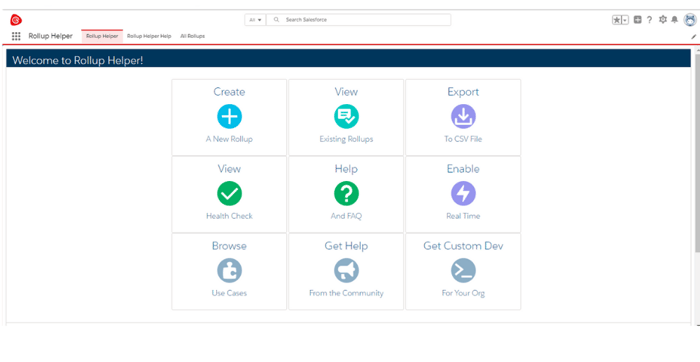
 Point. Click. Run. Rollup Helper Tour. 

Rollup  Helper Tour

Install Rollup Helper Free Edition
Watch Recorded Demo