
2026/10/22
Time-saving Salesforce® tips and resources, the latest app news, and more!
It starts with a single source of truth.
Our goal is to help you get consistent data that’s validated, connected, and aggregated before you add AI to the mix. When your organization has accurate Salesforce data and project information that's shared cross-functionally, it gives leadership the information needed to meet challenges, make decisions, plan ahead — and move forward. Explore the articles and product updates in this issue for practical tips you can implement that will get your organization operating from a single source of truth.
Unfortunately Admins Discover These Roadblocks After They’ve Built Reporting Workflows
Maybe you’ve run into situations like this before. Salesforce's native report viewer caps at 2,000 rows. Native rollup summary fields only work on master-detail relationships. You can’t create custom parent filters. To overcome roadblocks like these, read: 6 Questions to Ask Before You Install a Salesforce Data Aggregation App.
7 Factors to Consider When Evaluating Salesforce Data Quality Apps
Your Salesforce org's data quality directly impacts every report, automation, and AI initiative you run. Read: 7 Things to Know About Salesforce Data Quality Apps When Planning for 2027.
Your Ideas Directly Impact New App Functionality & Features
When we received a question from a customer who was wondering if Milestones PM+ would work with Salesforce's new dark mode feature, we added a dark mode custom setting. Read: Customer Ideas Inspire Powerful New App Features.
Customer Success Story Spotlight

Milestones PM+ Facilitates Collaboration & Streamlines Projects for St. Louis Development Corporation
We want to hear from you! Tell us your story.
App News & Updates
Milestones PM+ Automation Rule Designer Makes Creating Templates Easier!
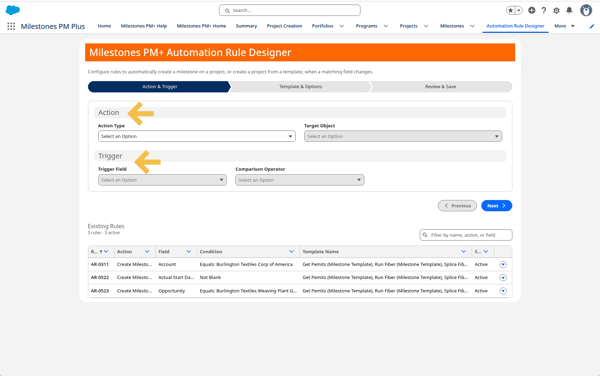
Did you know that you can automatically create a milestone or a project from a template? Meet the Milestones PM+ Rule Designer. It replaces complex custom settings and Apex flows with an intuitive, guided interface that makes template creation way easier.
Here’s how it works: A visual builder will walk you through defining your target objects and trigger fields. Then you can select up to five template files from your library, and it will guide you through validating the logic (see images below).
First define your target objects and trigger fields.
Next, select up to five template files from your library.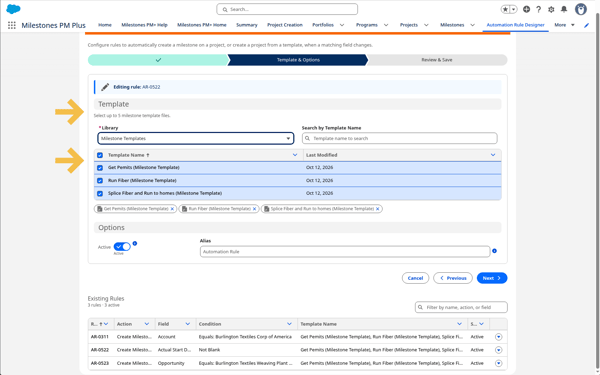
Then the visual builder will guide you through updating the logic. 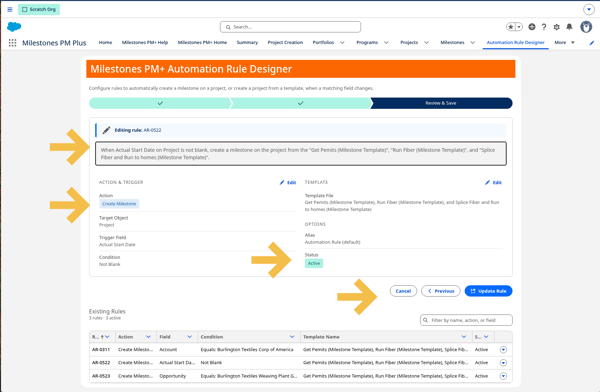
About Milestones PM+
Milestones PM+ is a cross-industry, native, project and process management solution for Salesforce. Milestones PM+ gives you instant 360-degree visibility to projects, tasks, programs, milestones, time, risks and issues, and resources in your CRM.
NEW! Lookup Helper Adds Authentication Functionality!
We added Lookup Helper Authentication (Connected App / OAuth) functionality so metadata access for deploying triggers, classes, and custom fields no longer depends on legacy session ID. This also means that Admins can grant and verify access right from the new Authentication page. See Lookup Helper Release Notes v10.25.
About Lookup Helper
Lookup Helper gives you better visibility and insights to your Salesforce data by automatically relating records. For standard and custom objects, it allows you to organize your data by geographic location, time-frame, industry, or any other data category.
First Look! Data Quality Helper’s New Filter Options
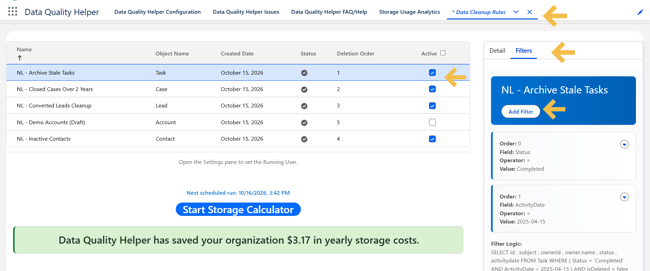
Have a friend who doesn’t have a filter? That can be so cringe, but it’s something you don’t need to worry about with Data Quality Helper! Soon you’ll be able to use 'starts with' and 'ends with' when filtering on Id and Reference fields when creating Data Cleanup Rules. This makes it easier to target records that use a prefix. For example, you can delete all EmailMessage records related to Account records simply by choosing RelatedToId 'starts with' 001 (the Account record ID prefix).
We’re also excited about the Storage Recycle Jobs / Data Cleanup Rules page, which has been rebuilt in Lightning Web Components. This gives Admins a modern Lightning UI when creating, editing, activating, and scheduling Data Cleanup Rules. In addition, formula fields on the Data Quality Helper upsert modal are now visible. (Translation: The upsert modal overrides the standard Salesforce create/edit record modal and allows the validation/duplicate rules to run.) These updates will be coming soon. Stay tuned for more!
The image below shows the new Data Cleanup Rules page’s modern Lightning UI and filter options.
About Data Quality Helper
With Data Quality Helper, Salesforce users are notified when bad or duplicative data is entered based on criteria chosen by Admins. This ensures users are entering or updating complete, correct, and non-duplicative data. Hard or Soft Customizable Data Validation & Duplicate Resolution Rules empower Admins to create reminders and warnings for users, which are displayed when certain criteria are met. In addition, Data Cleanup Rules let Admins easily manage data storage and automate a record deletion strategy.
Featured Use Case: Convert Declarative Lookup Rollup Summaries to Rollup Helper Settings
Our client was dealing with high-volumes of rollup settings in Declarative Lookup Rollup Summaries (DLRS) and needed an efficient way to convert them, so we developed a converter that would allow them to do this! To start converting your rollup summaries, read: Convert Declarative Lookup Rollup Summaries to Rollup Helper Settings.
Considering implementing Data Cloud or Agentforce, or both?
Need an add-on like CPQ, Field Service, Pardot, Quip, and maps? We're here for you. We can help you make the most of your investment — from initial setup and customizations to automation and analytics. Since 2008, our apps and development services have been trusted by Admins and developers for building solutions on the Salesforce platform. Whether you’re planning a Salesforce data migration, enhancement, or back office app integration project, we’ll deliver on your vision. It starts with a free 60-minute consultation with our development team to talk about your project vision.
We Want to Hear From You
Your feedback and reviews are important to us as we continue to add more features, usability improvements, and functionality to our apps!
| 6 Questions to Ask Before You Install a Salesforce Data Aggregation App | Passage Technology Blog |